A customer sends an Instagram message about a delayed order, follows up by email, and eventually calls customer support. Three employees respond without knowing about the previous conversations. Unfortunately, this disconnected experience is common in growing businesses.
I’ve found that understanding how to manage customer inquiries from multiple channels requires more than monitoring emails and social media. Businesses need a unified system that connects customer conversations, automates repetitive tasks, and helps employees resolve issues faster.
Whether you operate a US-based online store or a growing service company, the following strategies can help you build an efficient customer support workflow.
What Is the Difference Between Multichannel and Omnichannel Customer Support?
Multichannel customer support allows customers to contact businesses through email, phone, live chat, SMS, WhatsApp, and social media. However, these platforms often operate independently.
Omnichannel customer service connects supported channels, providing employees with a centralized view of customer conversations.
For example, when someone contacts a retailer through Facebook and later follows up by email, an integrated system can display previous messages when the customer’s identity is matched.
This eliminates repeated explanations, reduces communication gaps, and improves customer experiences.
I recommend an omnichannel approach because connected conversations provide better continuity than managing disconnected inboxes.
How Can Businesses Centralize Customer Inquiries in One Inbox?
A unified customer inbox brings messages from supported communication platforms into one operational dashboard.
Instead of constantly switching applications, customer service teams can review conversations, assign responsibilities, and monitor pending requests from a shared interface.
Platforms such as Zendesk and Zoho CRM offer customer management capabilities, although specific channel integrations depend on the product and plan.
I suggest evaluating shared inbox software based on integration options, employee accessibility, security, and reporting features.
As customer support teams grow, businesses also need a consistent process for preparing new employees to use shared inboxes, CRM platforms, ticketing systems, and communication tools.
Structured onboarding helps support agents understand channel-specific procedures, customer data policies, escalation rules, and response expectations before handling inquiries independently.
Learn how to create a digital onboarding process for employees to build a more organized training experience and help new team members adapt to customer support workflows.
Centralization also prevents duplicate responses by making ticket ownership visible to the entire support team.
How Does CRM Integration Improve Customer Communication?
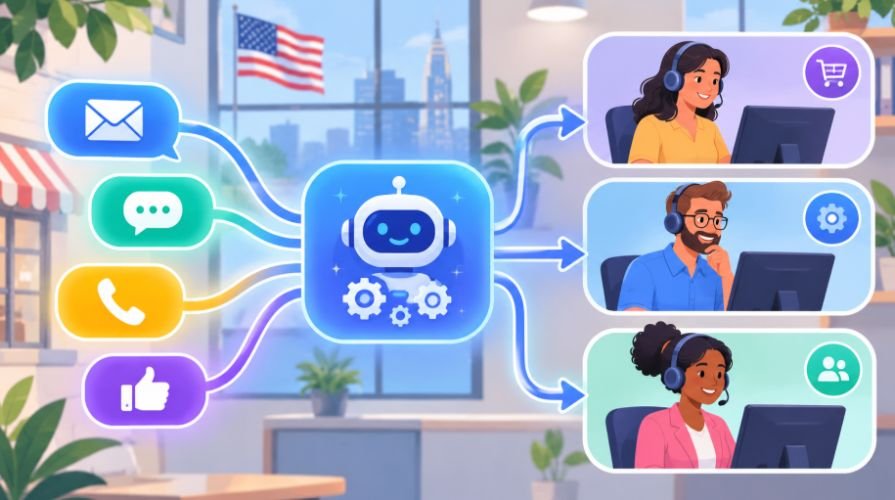
CRM integration connects customer inquiries with relevant account details, purchase records, and previous support interactions.
Imagine a customer contacting a Chicago-based clothing retailer about an incorrect delivery. Instead of requesting the order information repeatedly, an authorized support employee can review available purchase details and previous conversations.
A connected customer support ticketing system can also preserve conversation history when the customer changes communication channels.
I recommend maintaining accurate customer records while restricting access to sensitive information. US businesses should consider applicable privacy requirements, secure authentication, and appropriate data retention practices.
How Can Businesses Automate Inquiry Routing and Initial Responses?
Customer service automation helps businesses manage increasing inquiry volumes without overwhelming employees.
However, implementing automation is only worthwhile when it produces measurable operational improvements. Businesses should compare the time saved through automated ticket routing, faster initial responses, and reduced manual workload against software subscriptions, implementation expenses, and ongoing maintenance costs
Understanding how to measure ROI of business automation tools can help companies determine whether their customer service automation investments deliver meaningful financial and productivity benefits.
How Does Automated Ticket Routing Work?
Automated ticket routing categorizes incoming messages according to predefined rules.
For example, billing questions can enter an accounting queue, technical complaints can reach specialists, and urgent requests can receive higher priority.
Businesses can also create workstreams based on customer language, inquiry type, department, and employee availability.
I recommend reviewing these rules regularly to prevent incorrect assignments and unnecessary delays.
Why Should You Set Agent Capacity Limits?
Assigning too many simultaneous conversations can reduce response quality and increase employee stress.
Workload balancing allows managers to establish reasonable limits for concurrent chats, emails, and SMS conversations.
Because live chat requires immediate attention, employees may handle fewer active chats than asynchronous email tickets.
Setting agent capacity weights according to conversation complexity helps distribute support requests more effectively.
Can AI Chatbots Handle Repetitive Customer Questions?
AI chatbots can answer routine questions about business hours, shipping policies, return procedures, and appointment availability.
This approach, sometimes called AI deflection, reduces the number of repetitive inquiries requiring human assistance.
However, I recommend maintaining clear human escalation options for complicated complaints, billing disputes, and sensitive account issues.
Automated responses should use verified business information rather than generating unsupported answers.
How Should Businesses Set Response Times for Different Channels?

Channel-specific service level agreements (SLAs) establish measurable expectations for customer support teams.
Live chat generally requires faster responses than routine email inquiries. Social media and SMS may also require relatively quick attention during staffed hours.
For example, a business might target live chat responses within five minutes and routine email responses within one business day.
These are illustrative internal targets, not universal standards.
I also recommend automated acknowledgment messages that confirm receipt, provide ticket numbers, and explain expected response windows.
An acknowledgment reassures customers that their inquiry entered the system, even when immediate resolution isn’t possible.
How Can Support Teams Maintain Consistent Answers Across Platforms?
Customers should receive accurate information regardless of their preferred communication channel.
Consistent customer communication can also influence whether website visitors become paying customers. When businesses provide clear product information, respond promptly to questions, and make it easy for visitors to get assistance, they can reduce uncertainty during the buying process.
Improving these customer-facing experiences is one part of how to improve website conversion rates, particularly for businesses that rely on online inquiries to generate sales.
A centralized customer service knowledge base helps employees access approved policies, troubleshooting guides, and response templates.
However, communication styles should match each platform.
Email responses can provide detailed explanations, while live chat and messaging applications benefit from concise, conversational replies.
Public social media responses should remain professional and direct customers to secure private channels when personal information is required.
I recommend regularly training employees on these differences while maintaining consistent underlying information.
Which Customer Inquiry Management Tools Are Best for Small Businesses?
Small businesses should choose software according to their communication volume, budget, and integration requirements.
A shared inbox may be sufficient for handling basic email and messaging requests. Growing businesses may need automated ticket assignment, CRM integration, analytics, and advanced omnichannel customer service features.
Before investing, I suggest testing how each platform handles duplicate inquiries, conversation history, employee permissions, and customer support workflows.
Businesses can often begin with affordable tools and expand their capabilities as customer demand increases.
How Can Businesses Measure Customer Support Performance?
Effective customer response management requires regular performance monitoring.
I recommend tracking first-response time, average resolution time, customer satisfaction scores, unresolved ticket volumes, and repeat-contact rates.
These measurements reveal communication bottlenecks and opportunities for improvement.
For instance, repeated questions about shipping delays may indicate unclear delivery information rather than insufficient support staffing.
Regularly reviewing customer feedback helps businesses improve their processes instead of simply answering messages faster.
What Common Customer Support Mistakes Should Businesses Avoid?

One major mistake is opening additional communication channels without assigning employees to monitor them.
Other common problems include disconnected customer records, unclear ticket ownership, excessive agent workloads, inconsistent responses, and overreliance on AI automation.
I recommend reviewing these operational risks before introducing additional software.
A well-organized support process usually delivers more value than an unnecessarily complicated technology stack.
Frequently Asked Questions
1. What Is the Best Way to Handle Customer Messages Across Several Platforms?
Centralize supported channels in a shared inbox, maintain customer history, assign ticket ownership, and automate routine inquiries. This reduces duplicated work and missed messages.
2. Can Small Businesses Use Omnichannel Customer Support?
Yes. Small businesses can start with a shared inbox, basic CRM features, and documented response procedures before adopting advanced automation tools.
3. How Do You Prevent Duplicate Customer Support Tickets?
Use conversation linking, customer identity matching, duplicate detection, and shared ticket ownership. Employees should review existing interactions before opening new tickets.
4. What Are the Benefits of Automated Customer Inquiry Management?
Automation reduces repetitive administrative work, improves ticket routing, supports faster acknowledgments, and helps employees focus on complicated customer problems.
Conclusion
I believe how to manage customer inquiries from multiple channels ultimately comes down to connecting people, processes, and technology.
By centralizing conversations, establishing channel-specific SLAs, balancing employee workloads, and using automation responsibly, US businesses can deliver more reliable customer experiences.
Start by improving your busiest communication channels, connect customer information where appropriate, and gradually introduce advanced support tools. A consistent, scalable workflow can help reduce missed inquiries while building stronger customer relationships.