A new employee’s first impression of your company begins long before their first day. Confusing paperwork, delayed equipment, and scattered emails can make an exciting career move unnecessarily stressful. I’ve found that understanding how to create a digital onboarding process for employees helps businesses replace these frustrations with a smooth, organized experience.
For US businesses, successful onboarding means more than uploading documents. It requires secure digital workflows, automated HR tasks, structured training, and meaningful employee connections. I’ll explain how to build a practical onboarding system that supports new hires from their signed offer through their first 90 days.
What Is a Digital Employee Onboarding Process?
A digital employee onboarding process uses online platforms to manage employment paperwork, workplace orientation, training, and employee integration.
Instead of relying on manual forms and disconnected systems, businesses use a centralized HR onboarding workflow to coordinate responsibilities across departments.
An effective system connects digital document collection, employee onboarding automation, learning resources, IT provisioning, and progress tracking.
This approach works particularly well for remote and hybrid employees, but traditional offices can also benefit from faster administration and consistent onboarding experiences.
How to Create a Digital Onboarding Process in 7 Steps
I recommend building your system around seven practical steps that combine technology with human interaction.
Step 1: How Do You Identify and Organize Onboarding Tasks?
Start by mapping your existing process from offer acceptance through the employee’s first 90 days.
Identify required documents, equipment requests, training activities, introductions, and manager responsibilities.
Assign each task an owner and deadline. This creates a digital onboarding checklist that prevents important activities from being overlooked.
Step 2: Which Digital Employee Onboarding Software Should You Choose?
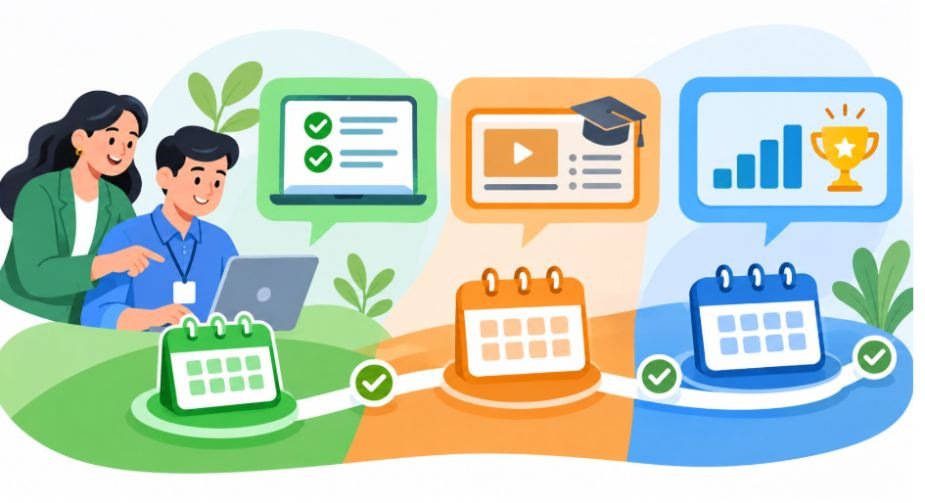
Choose technology that matches your company size, budget, and existing systems.
HR platforms such as BambooHR, Rippling, HiBob, and Personio can help centralize employee information and onboarding administration.
Look for secure document storage, electronic signatures, task automation, payroll integrations, and employee self-service.
Smaller businesses can begin with existing applications before investing in a comprehensive HR information system (HRIS).
For businesses that want to connect employee onboarding with broader customer-facing operations, CRM software can also support internal coordination and access to customer relationship information.
Depending on the role, giving new hires access to an organized CRM system can help them understand customer records, sales activities, and communication workflows more quickly.
Comparing the best CRM software for small businesses can help companies select a platform that fits their operational requirements and existing business systems.
Step 3: How Can You Automate Employee Paperwork?
Replace repetitive paperwork with secure digital forms and electronic signatures.
Tools such as DocuSign and Dropbox Sign, formerly HelloSign, can support electronic agreement workflows.
Create automated requests for employment contracts, applicable tax forms, direct deposit information, and policy acknowledgments.
Protect sensitive information through encryption, restricted access, and secure document management.
Because digital onboarding involves collecting sensitive employee details, businesses should establish clear security practices for every system used to store or process this information.
Use multi-factor authentication, role-based access controls, regular software updates, and employee security awareness training to reduce the risk of unauthorized access or data exposure. Following these cybersecurity best practices for small businesses can help protect employee records while maintaining a secure digital onboarding environment.
Step 4: How Do You Automate IT Equipment and Account Setup?
Coordinate equipment and access requirements before employees start.
Platforms such as Firstbase and Rippling can support device management, while identity solutions such as Okta help manage application access.
Automated workflows can notify IT teams to prepare laptops, configure email accounts, and arrange access to Slack, Microsoft Teams, or role-specific applications.
Cloud-based infrastructure can make this setup easier by giving employees access to business applications, shared resources, and files without depending entirely on local office systems.
It can also help growing companies scale their IT resources as new employees join, while supporting remote and hybrid work arrangements. Exploring the cloud computing benefits for small businesses can help employers understand how cloud services support flexible access, collaboration, and more efficient technology management.
Require appropriate approvals before granting sensitive permissions.
Step 5: How Can You Build an Engaging Digital Training Program?
Create self-paced training modules covering company policies, cybersecurity, workplace expectations, and job responsibilities.
Learning management systems such as TalentLMS or Seismic Learning can support structured instruction, while Notion can organize internal knowledge resources.
Avoid overwhelming employees with excessive information on Day 1. Deliver training gradually through short videos, interactive lessons, and practical activities.
Step 6: How Do You Help Remote Employees Build Relationships?
Digital onboarding should never eliminate personal interaction.
Schedule manager introductions, team meetings, and informal conversations.
I recommend assigning each employee an onboarding buddy. Tools such as Donut can help facilitate virtual introductions and coffee chats.
Regular video meetings create opportunities to ask questions, understand workplace culture, and build confidence.
Step 7: How Can You Track and Improve Onboarding Performance?

Monitor document completion, training progress, employee satisfaction, and time to productivity.
Use automated feedback surveys at approximately 14, 30, and 90 days.
Platforms such as Culture Amp or Google Forms can support employee feedback collection.
Review the results, identify recurring problems, and improve the process before onboarding additional employees.
What Should a Digital 30-60-90 Day Onboarding Plan Include?
A structured 30-60-90 day onboarding plan gives employees clear expectations while allowing managers to monitor progress.
Before Day 1: How Should You Prepare New Employees?
Send a centralized welcome portal containing the first-week schedule, workplace expectations, dress code, and a short leadership video.
Complete suitable preboarding tasks, arrange equipment delivery, and provide necessary instructions.
First Week: How Do You Handle Orientation and Training?
Introduce coworkers, activate approved accounts, explain company policies, and assign initial training.
Use a learning management system for essential courses and schedule personal check-ins to answer questions.
Days 30–90: How Do You Build Employee Independence?
During the first month, focus on foundational knowledge and supervised responsibilities.
By Day 60, encourage employees to handle more complex assignments independently.
At Day 90, review performance, gather feedback, and establish future development goals.
Interactive milestone trackers in Asana, ClickUp, or monday.com can help employees and managers follow progress.
How Can US Businesses Keep Digital Onboarding Compliant?
Understanding how to create a digital onboarding process for employees also requires careful attention to federal and state employment requirements.
Under USCIS Form I-9 requirements, employees generally complete Section 1 no later than their first day of employment. Employers generally complete Section 2 within three business days after employment begins.
Remote document examination is available only under applicable authorized procedures.
The IRS also provides guidance on collecting Form W-4 information for federal income tax withholding.
Employers should address state new-hire reporting, applicable workplace notices, record retention, and employee data security.
Digital platforms simplify administration but do not automatically guarantee legal compliance.
What Are the Biggest Digital Onboarding Mistakes to Avoid?

One common mistake is overwhelming employees with documents and training during their first day. Gradual learning creates a more manageable experience.
Another is replacing personal interaction with automation. Employees still need managers, mentors, and meaningful workplace connections.
Businesses also frequently overlook manager responsibilities. Automated reminders should prompt supervisors to schedule introductions, one-on-one meetings, and progress reviews.
Finally, avoid disconnected systems that duplicate employee information or create unnecessary security risks.
Frequently Asked Questions
1. How Long Does Digital Employee Onboarding Take?
Administrative tasks may begin before an employee’s first day, while orientation, training, and integration commonly extend across the first 30 to 90 days.
2. Can Small Businesses Automate Employee Onboarding?
Yes. Small businesses can combine secure online forms, electronic signatures, task management applications, and automated emails without purchasing expensive enterprise software.
3. What Is the Best Software for Remote Employee Onboarding?
BambooHR, Rippling, and HiBob are options to evaluate for HR administration. The best choice depends on workforce size, integrations, security requirements, and budget.
4. How Do You Measure Employee Onboarding Success?
Track paperwork completion, training participation, employee satisfaction, time to productivity, and feedback from scheduled check-ins.
Conclusion
I believe effective onboarding combines efficient technology with genuine human support. Learning how to create a digital onboarding process for employees gives businesses a practical way to reduce administration, improve consistency, and build stronger employee experiences.
Start with clear responsibilities, introduce reliable automation, and maintain meaningful communication throughout the first 90 days. A well-designed system can help new hires feel prepared, connected, and ready to contribute.