
A product team can now move from a written feature idea to something resembling a clickable application before the first traditional wireframe is finished. That shift is why AI ui design generators for rapid prototyping are becoming useful far beyond design departments.
The best tools can interpret prompts, screenshots, sketches, existing design systems, and sometimes voice instructions. They generate screens, connect user flows, create responsive components, and increasingly produce usable front-end code.
The catch is equally important: speed does not automatically produce good UX. AI can generate a polished checkout screen in seconds while quietly introducing poor navigation, inaccessible controls, inconsistent components, or an interaction that makes little sense to an actual customer.
The real advantage, therefore, is not replacing designers. It is shortening the distance between an idea and something users can test.
The Leading AI UI Generators and Where They Fit
There is no universal winner among AI ui design generators for rapid prototyping. Some tools prioritize visual exploration, while others are effectively design-to-code environments.
Figma Make: Best for Teams Already Working in Figma
Figma Make makes the most sense when designers already depend on Figma for components, collaboration, design systems, and developer handoff.
Prompt-driven generation can accelerate early layouts and interactive concepts without forcing a team to leave its existing workspace. The bigger advantage is editability: generated ideas can continue through a conventional design process rather than becoming isolated AI artifacts.
For established product teams, that continuity can matter more than raw generation speed.
v0 by Vercel: Strong for Prototype-to-Code Workflows
v0 approaches the problem from the developer side. Instead of stopping at visual mockups, it excels at converting natural-language requests into modern component-based web interfaces. This makes it particularly useful when the prototype is expected to become a functioning React or Next.js application.
The tradeoff is that code generation does not eliminate engineering review. Generated interfaces still require checking for component architecture, responsiveness, application state, performance, security, and accessibility. Teams interested in that development side can also explore our guide to AI coding assistants for web developers.
Google Stitch: Excellent for Fast Visual Exploration
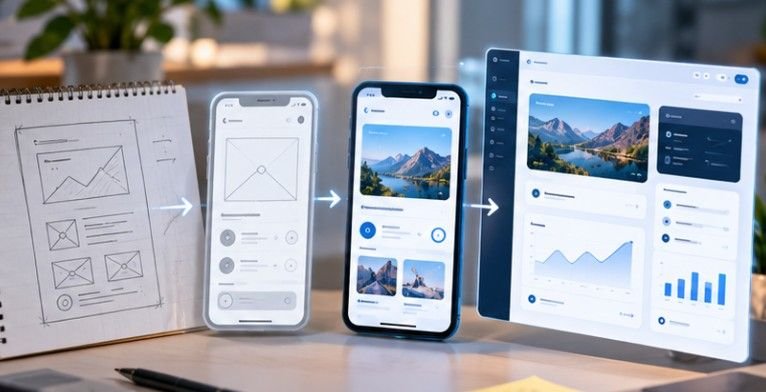
Google Stitch has become especially interesting for concept exploration. It can turn written instructions and visual references into UI directions and offers pathways into Figma or front-end implementation. Its strength is iteration: instead of manually rebuilding a layout whenever stakeholders change direction, teams can explore alternatives conversationally. That makes Stitch useful during workshops, early product discovery, redesign exercises, and client concept presentations.
Uizard: Best for Non-Designers and Rough Concepts
Uizard remAIns attractive because the starting material does not have to be sophisticated. A founder might upload a rough sketch. A product manager might begin with a screenshot. A marketer can describe a dashboard without understanding Auto Layout or component architecture.
Uizard can transform those inputs into editable multi-screen concepts, lowering the skill barrier to prototyping. That does not make the output production-ready. Its real value is giving teams something concrete to discuss much earlier.
UX Pilot: Useful for Flows and UX-Led Exploration

UX Pilot focuses more heavily on the UX process rather than simply generating visually impressive screens. Its workflow can help teams explore screen sequences, wireframes, high-fidelity concepts, design-system-based output, and early attention patterns.
That is particularly useful for onboarding, subscription flows, dashboards, checkout paths, and other products where relationships between screens matter as much as individual layouts. Predictive analysis should still be treated as directional evidence rather than a replacement for human research.
Flowstep, Banani, Visily, and Other Emerging Options
Smaller platforms increasingly differentiate themselves through workflow specialization. Flowstep emphasizes user flows and structured interface creation. Banani offers rapid visual variation, which can help teams compare different design directions. Visily is useful where teams want to turn rough concepts, screenshots, or wireframes into cleaner interface ideas without traditional design expertise.
Meanwhile, platforms such as Bolt.new increasingly blur the boundary between UI generator and application builder. This market is moving quickly enough that teams should evaluate capabilities rather than committing based solely on brand recognition.
Choose the Tool Based on the Output You Actually Need
The fastest way to select a platform is to ask one question:
What must exist when the prototyping session ends?
If the answer is editable design work inside an established design system, Figma-centered workflows deserve priority.
If the answer is working React components, v0 or another code-oriented generator is more logical.
If you need several visual directions for stakeholder discussion, Stitch or Banani may provide more value.
If non-designers need to convert sketches and rough concepts into clickable screens, Uizard or Visily becomes more attractive.
If the goal is analyzing a complete user journey, UX-oriented tools deserve more weight than generators specializing in isolated pages.
Tool selection should follow the workflow—not the hype.
Where AI-Generated UI Still Goes Wrong
The most dangerous misconception is that polished output equals validated design. Generative systems reproduce patterns exceptionally well. That strength can also make products look interchangeable. Cards, gradient dashboards, rounded panels, oversized headings, familiar navigation patterns, and generic SaaS layouts can appear repeatedly.
AI systems also operate with incomplete context. NIST’s AI Risk Management Framework emphasizes incorporating trustworthiness considerations throughout design, development, use, and evaluation rather than treating AI output as inherently dependable.
Human-centered AI education is similarly becoming part of UX trAIning. The University of Texas at Austin, for example, includes AI-integrated product concept design and Figma-based AI prototyping within its human-centered AI UX coursework.
The pattern is clear: AI belongs inside a design process, not above it.
Turn Rapid Generation Into Better Product Decisions
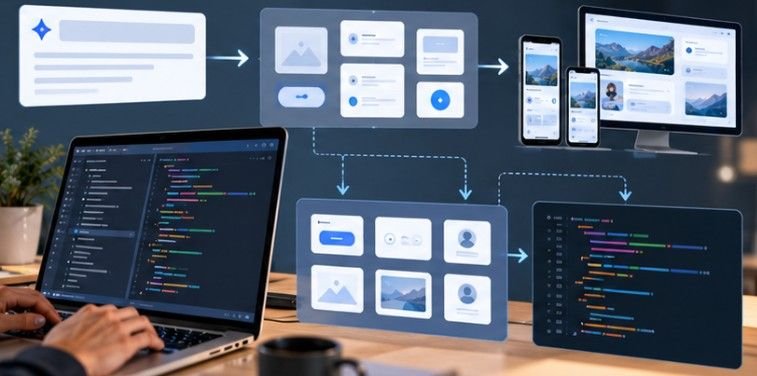
The strongest workflow combines machine speed with human judgment. Start by defining the user problem before writing the prompt. Generate several directions rather than accepting the first attractive result. Remove obviously weak options, then test the strongest prototype agAInst actual tasks.
Record where users hesitate, misunderstand labels, miss actions, abandon flows, or require assistance. Then regenerate or refine. Repeat until the design is supported by evidence rather than aesthetics.
Teams already using AI to analyze customer, operational, or product information can apply the same evidence-first mindset described in our guide to AI tools for business data analysis.
That iterative loop is where AI ui design generators for rapid prototyping become genuinely valuable: not generating more interfaces, but helping teams reject weak ideas earlier.
Frequently Asked Questions
1. Can AI UI generators replace UX designers?
Not reliably. They accelerate ideation, wireframing, visual exploration, and code generation, but product strategy, accessibility, research, interaction judgment, and validation still require human expertise.
2. Which AI UI generator is best for developers?
v0 is particularly useful for teams wanting React or Next.js-oriented UI output. Code-focused platforms can reduce prototype-to-development friction but still require engineering review.
3. Which tool is easiest for non-designers?
Uizard and Visily are strong choices because they can transform prompts, screenshots, sketches, and rough concepts into editable interface designs without requiring advanced design-tool experience.
4. Should AI-generated prototypes be usability tested?
Yes. AI generation speeds up creation, not validation. Test important flows with representative users before treating generated layouts or interactions as reliable product decisions.
Final Takeaway
The biggest change in interface design is not that AI can create a screen quickly. It is that teams can now afford to explore, discard, and retest far more ideas before committing expensive development time.
Use that advantage deliberately.
Choose a generator based on the output your team needs, constrAIn it with a real design system, check accessibility from the beginning, and test the result with actual users. The winning prototype will rarely be the one AI produced fastest. It will be the one your team improved fastest after discovering where the first version was wrong.