Three years ago, a two-week production sprint left my lower back so locked up I could barely stand straight after closing my laptop. That wake-up call forced me to test and build a routine of simple desk stretches for software developers with back pain that fits directly into a busy engineering schedule. Taking just two to three minutes every hour to perform targeted seated and standing movements reverses spinal compression without breaking your deep-work flow.
Why Coding Wrecks Your Spine (And How I Fixed Mine)
Sitting in an office chair for eight to ten hours puts your musculoskeletal system in a mechanical trap. When you lean toward your monitor to debug a stubborn memory leak, your hip flexors shorten and pull on your pelvis. At the same time, your mid-back rounds forward, forcing your lumbar spine to absorb extra load.
According to Harvard Health Publishing, prolonged sitting increases pressure on your spinal discs compared to standing or walking. I used to rely on expensive lumbar pillows and weekend massages, yet Monday afternoon always brought the same dull ache back.
Real relief only started when I treated mobility like automated testing. Instead of waiting until 6:00 PM to fix hours of stiffness, I paired short movement breaks with an ergonomic desk setup for long coding hours to keep my spine neutral throughout the day.
Quick Safety Check: Muscular Tightness vs. Nerve Strain
Before you start pulling on tight muscles, spend ten seconds evaluating what your body is actually telling you. Not every back ache responds well to stretching, and pushing through the wrong kind of pain can turn a minor strain into a serious injury.
Normal muscular tightness feels like a dull ache, stiffness, or heavy fatigue across your lower or upper back after holding one posture. This type of tension responds quickly to gentle movement and increased blood flow.
Joint or nerve strain feels sharp, electric, or shooting. If you feel tingling, pins and needles, or numbness radiating down your glutes or legs, stop stretching immediately. As specialists at the Cleveland Clinic advise, radiating nerve symptoms or pain that wakes you up at night require prompt evaluation by a doctor.
My 5-Minute Desk Stretch Routine for Long Coding Sessions
I run through this entire sequence once in the mid-morning and once in the mid-afternoon, or break it into single moves every hour. Move slowly, breathe deeply, and never force a joint past a mild, comfortable tension.
1. Seated Cat-Cow for Spinal Mobility
This foundational move lubricates stiff spinal joints after you have been locked in intense concentration. Sit near the front edge of your chair with both feet planted flat on the floor and your hands resting lightly on your knees.
Inhale deeply through your nose as you arch your lower back, push your chest forward, and lift your chin slightly. Exhale slowly as you round your spine backward, tuck your chin toward your chest, and pull your belly button inward. Complete eight to ten slow repetitions, matching each movement to a full breath.
2. Seated Figure-Four Stretch for Tight Glutes and Lower Back
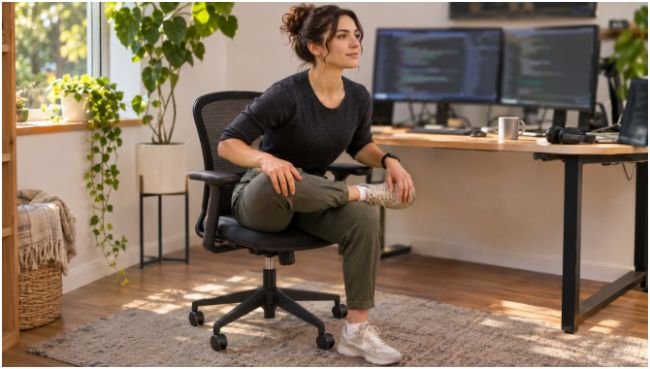
Tight glutes and piriformis muscles pull directly on your lower back, especially if you sit with one wallet-heavy pocket or cross your legs while coding. Sit upright with your left foot flat on the floor, then cross your right ankle over your left knee. Flex your right foot to protect your knee joint from sideways torque.
Keep your spine straight and hinge forward slightly from your hips—not your waist—until you feel a deep stretch in your right glute and outer hip. Hold this position for 20 to 30 seconds per side for two sets.
3. Seated Spinal Twist for Thoracic Relief
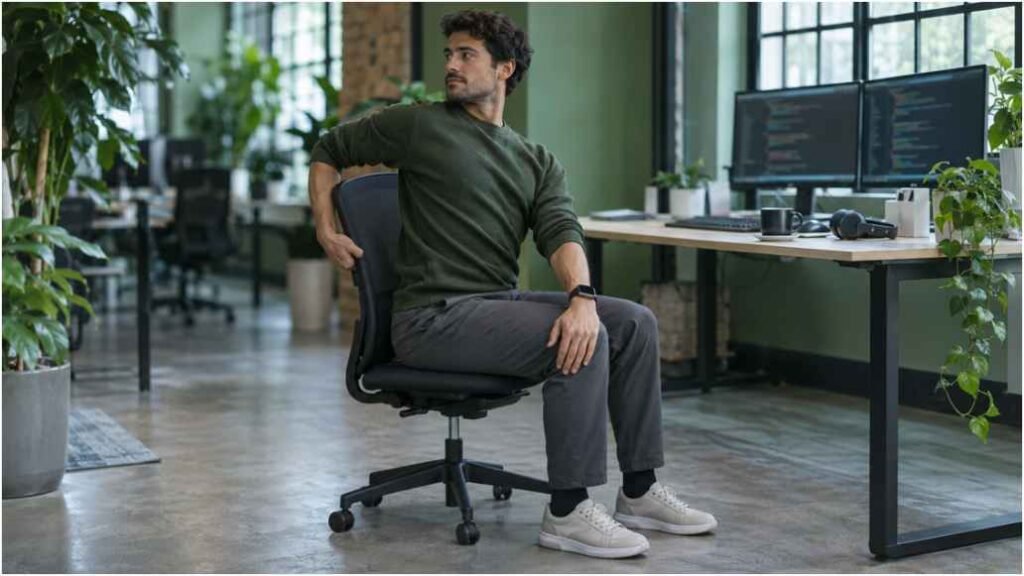
Your thoracic spine controls rotation, and when it stiffens up from typing, your lower back twists to compensate. Sit tall with your feet planted flat and your hips facing straight ahead toward your desk.
Place your left hand on the outside of your right thigh and rest your right hand on the back of your chair. Gently rotate your upper torso to the right, looking over your right shoulder without cranking your neck. Hold for 15 to 20 seconds on each side across two sets.
4. Standing Hip Flexor Lunge for Lower Back Decompression

Standing up is non-negotiable if you want to undo hip flexion. Stand beside your desk and hold the edge lightly for balance, then step your right foot back into a comfortable staggered stance.
Slightly bend your front knee and tuck your tailbone under to flatten your lower back. Gently shift your weight forward until you feel a clear stretch in the front of your right hip, avoiding the urge to lean your chest forward. Hold for 20 to 30 seconds per side for two sets, following safe movement principles similar to the Mayo Clinic’s office stretches.
5. Desk-Supported Lat and Upper Back Stretch
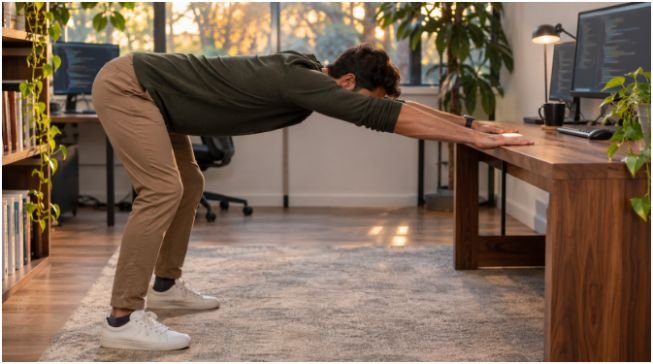
Reaching forward for a mouse and keyboard tightens your latissimus dorsi muscles, which attach directly to your lower spine and pelvis. Stand facing your desk, place both hands shoulder-width apart on the edge, and walk your feet backward until your torso sits roughly parallel to the floor.
Keep your knees softly bent and press your chest gently downward toward the floor, lengthening through your arms, shoulders, and upper back. Hold this decompression stretch for 20 to 30 seconds for two sets.
How I Anchor Stretches to My Daily Git and Build Workflow
Setting a loud hourly timer sounds great in theory, until it interrupts you mid-thought while tracing an asynchronous race condition. After turning off my reminders three days in a row, I built what I call the CI/CD Micro-Mobility Protocol.
Instead of relying on the clock, I tie one or two stretches to natural latency gaps that already exist in my engineering workflow:
| Engineering Trigger | Estimated Pause | Paired Desk Stretch |
| Local Docker / Webpack Build | 45–90 seconds | Standing Hip Flexor Lunge (1 set per side) |
| Running Unit & Integration Tests | 60–120 seconds | Seated Figure-Four Stretch (1 set per side) |
| Waiting on CI Pipeline / Deployment | 2–3 minutes | Desk-Supported Lat Stretch + Seated Cat-Cow |
| Pre-PR Review Mental Reset | 60 seconds | Seated Spinal Twist + gaze shift to rest eyes |
Pairing physical movement with screen breaks also gives you an effortless window to prevent eye strain from staring at screens using the 20-20-20 rule. Additionally, reviewing the OSHA Computer Workstations eTool helped me raise my external monitor to eye level so my upper back stopped rounding between sets.
Frequently Asked Questions About Desk Stretches for Coders
1. How often should software developers stretch at their desk?
Aim for two to three minutes of light stretching every 45 to 60 minutes during active coding blocks.
2. Can desk stretches cure chronic lower back pain from sitting?
Simple stretches relieve muscular stiffness and joint compression, though persistent pain requires a medical evaluation and core strengthening.
3. What is the single best stretch for programmers with lower back stiffness?
The standing hip flexor lunge delivers the fastest relief because it directly reverses the seated hip angle pulling on your lumbar spine.
4. Should I stretch if I feel tingling or sharp pain in my lower back?
No, sharp pain or leg tingling signals potential nerve irritation, so you should stop immediately and consult a healthcare professional.
Ship Better Code Without Sacrificing Your Spine
Your IDE alerts you the second a syntax error threatens your build, yet most of us ignore physical warning signs until our backs crash completely. Pick just one trigger from your daily workflow—like your next test suite run—and stand up for a 30-second hip flexor lunge before you check the console output.