
Every minute employees spend copying customer information, processing invoices, or updating spreadsheets is time they could spend growing the business. I’ve noticed that repetitive administrative tasks often become so routine that owners overlook their actual cost. Understanding how to reduce manual data entry in small business can help US entrepreneurs improve productivity without investing in complicated technology.
The solution isn’t necessarily hiring more employees or replacing existing software. Instead, I recommend identifying repetitive workflows, connecting essential applications, and capturing information correctly the first time.
Why Does Manual Data Entry Slow Down Small Businesses?
Manual data entry creates unnecessary work and increases the likelihood of mistakes. Employees might enter incorrect invoice amounts, duplicate customer records, or forget to update inventory after processing an order.
For example, a small US retailer might manually transfer online orders into accounting software before updating inventory records. Repeating these steps for every transaction wastes valuable hours.
Small business workflow automation reduces this burden by transferring information between compatible systems automatically, allowing employees to concentrate on customer service and revenue-generating activities.
Many of these improvements begin by identifying repetitive tasks that follow predictable steps, such as copying customer details, updating records, or processing routine requests. Businesses can simplify these activities by creating standardized workflows and using suitable automation tools to reduce manual effort.
Learn more about how to automate repetitive business tasks and identify practical opportunities to improve everyday operations.
How Can Small Businesses Identify Repetitive Data Entry Tasks?
Before purchasing automated data entry software, I recommend examining where employees repeatedly copy information between applications.
Review customer inquiries, sales orders, payroll records, invoices, expense reports, and inventory updates. Identify which activities happen most frequently and require the greatest effort.
A practical approach is to measure how long each task takes and how often employees perform it.
For instance, transferring customer details from emails into a CRM might take only three minutes. However, processing 40 inquiries weekly creates two hours of repetitive work.
Prioritize high-volume activities with predictable steps and relatively few exceptions. This makes automation easier to implement and evaluate.
How Can You Connect Business Applications to Eliminate Repetitive Data Entry?
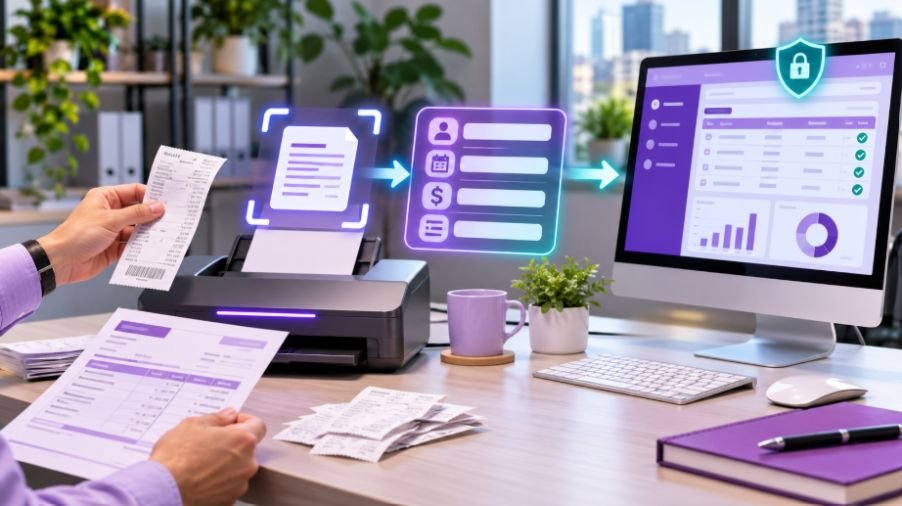
Connecting existing applications is one of the most effective ways to eliminate repetitive data entry.
Tools such as Zapier, Make, and Microsoft Power Automate allow compatible systems to exchange information without constant manual intervention.
For example, a customer submitting a contact form could automatically generate a CRM record, notify the sales team, and update a spreadsheet.
Businesses can also connect CRM and accounting software to synchronize customer information and reduce duplicate records.
I suggest checking native integrations before purchasing third-party software. Built-in connections may offer simpler setup, lower maintenance requirements, and more consistent data synchronization.
Can Ecommerce Stores Automatically Sync Sales and Inventory?
Yes. Ecommerce businesses can connect supported storefronts, marketplaces, accounting platforms, and inventory management systems.
For example, a Shopify store connected to compatible inventory software can update stock quantities when customers place orders.
This reduces manual order processing, helps prevent overselling, and improves record accuracy.
I recommend testing refunds, canceled orders, and inventory adjustments before relying entirely on automatic synchronization.
How Can Digital Forms and Self-Service Portals Reduce Data Entry?
Digital forms help small businesses capture information directly from customers instead of retyping handwritten documents or emails.
Google Forms, Microsoft Forms, and website intake forms can collect names, email addresses, phone numbers, and service requirements.
A landscaping company, for example, could allow customers to submit service requests online, automatically transferring their details into a scheduling system.
Self-service booking links and online payment portals provide additional opportunities to reduce administrative work.
Customers can schedule appointments, update contact information, and complete payments without employees entering every transaction manually.
I recommend using required fields, dropdown menus, and standardized formats to improve data quality during collection.
How Does OCR Software Automate Invoice and Receipt Processing?

Optical character recognition, or OCR, extracts readable text from scanned documents, receipts, invoices, and PDFs.
Modern document-processing tools can identify supplier names, transaction dates, invoice numbers, and payment amounts.
This makes it easier to automate invoice data entry and reduce repetitive bookkeeping tasks.
For example, a construction contractor could upload supplier invoices and have relevant details extracted for review before entering the accounting system.
Tools such as Parseur and compatible accounting document-processing solutions support these workflows.
However, I always recommend reviewing unusual transactions and low-confidence results. Human verification remains important for preventing inaccurate payments and financial records.
How Can You Automate Google Sheets and Excel Data Entry?
Spreadsheets remain affordable and useful for smaller businesses.
Google Forms can automatically populate Google Sheets, while formulas and validation rules help identify missing information or duplicate entries.
Microsoft Excel offers Power Query for importing, transforming, and refreshing information from supported sources.
CSV imports also allow businesses to transfer large transaction datasets without manually typing individual records.
I recommend establishing consistent column names, date formats, and customer identifiers before introducing spreadsheet automation.
Businesses should also maintain reliable financial documentation. The Internal Revenue Service requires appropriate records supporting business income and expenses, regardless of whether a company uses automated or manual systems.
How Can Data Validation Prevent Costly Automation Errors?
Automation works best when incoming information is accurate.
I recommend configuring validation rules for email addresses, phone numbers, required fields, customer IDs, and other standardized information.
Duplicate detection can prevent multiple customer records from being created when identical details arrive through different channels.
Businesses should also establish one authoritative source for each important type of data.
For example, a CRM might manage customer profiles, while accounting software maintains official financial transactions.
Access controls, integration permissions, exception alerts, and regular audits help reduce data entry errors while protecting sensitive business information.
Protecting automated workflows also requires a broader cybersecurity strategy. Small businesses should use multi-factor authentication, strong passwords, regular software updates, secure network connections, and employee security awareness training to reduce the risk of unauthorized access. These measures help protect customer information and business records as data moves between connected applications.
Explore these cybersecurity best practices for small businesses to strengthen your organization’s overall security.
How Much Money Can Small Businesses Save With Data Entry Automation?
Understanding how to reduce manual data entry in small business becomes more valuable when owners measure financial results.
Imagine a company spending five hours weekly on repetitive administrative work at an estimated labor cost of $25 per hour.
That equals $125 weekly or $6,500 annually.
If automation eliminates 80% of that workload, the business could recover approximately $5,200 worth of employee time annually, before accounting for software costs, setup expenses, and maintenance.
These numbers are illustrative, not guaranteed savings.
I recommend comparing working hours, error rates, and processing costs before and after implementing automation.
The time recovered through automation can also help small businesses focus on activities that generate revenue, including customer outreach and promotion. Rather than increasing marketing budgets immediately, owners can explore cost-effective ways to attract customers, strengthen their online presence, and build brand awareness.
These affordable marketing ideas for small business growth can help businesses make better use of their available resources.
How Can Small Businesses Start Automating Data Entry in Seven Days?

I recommend beginning with one workflow rather than automating every department simultaneously.
During the first two days, identify repetitive tasks and map how information moves between applications.
On days three and four, select a compatible tool and configure the workflow.
Use day five to test real-world scenarios, including missing information, duplicate submissions, and failed integrations.
On day six, involve employees in reviewing the results and correcting problems.
By day seven, compare performance against the original manual process and decide whether the automation is ready for regular use.
This small-pilot approach reduces disruption and makes expansion easier.
Frequently Asked Questions
1. What Is the Easiest Way to Automate Data Entry for a Small Business?
Start with digital forms connected to spreadsheets or CRM software. These tools capture customer information automatically and reduce repeated typing.
2. Can Small Businesses Reduce Manual Data Entry Without Expensive Software?
Yes. Google Forms, spreadsheet formulas, CSV imports, and free or entry-level automation plans can help businesses streamline routine tasks affordably.
3. What Are the Best Tools for Small Business Data Entry Automation?
Zapier, Make, Microsoft Power Automate, Google Forms, and OCR document-processing tools are useful options. The best choice depends on application compatibility, budget, and workflow complexity.
4. How Can Automated Data Entry Improve Business Accuracy?
Automation reduces repetitive typing, while validation rules, duplicate detection, exception monitoring, and human review help prevent incorrect information from spreading across systems.
Conclusion
Reducing administrative workloads starts with smarter processes rather than expensive technology. I’ve found that the most practical strategy is to capture information once, connect existing tools, and automate predictable tasks while maintaining human oversight.
By applying these approaches to how to reduce manual data entry in small business, owners can improve accuracy, reduce operating inefficiencies, and free up time for meaningful business growth.
The best place to begin is the repetitive task that consumes the most time every week.