After six years of shipping code on a 14-inch MacBook from kitchen tables and cramped home offices, my upper back felt like concrete. Learning how to fix bad posture from working on a laptop became urgent the morning I woke up with a pinched nerve in my neck.
Standard advice told me to “just sit up straight” or buy a $1,200 chair. Neither worked because willpower fades the second you enter a deep debugging session. Over 90 days, I tested hardware adjustments and movement triggers until my daily back pain dropped from a seven to a one.
Why Laptops Are Biomechanical Traps for Your Spine
A laptop violates basic human anatomy by design. Because the screen attaches directly to the keyboard, you face an impossible choice every time you open the lid.
If you place the keyboard at a comfortable typing height, you must crane your neck downward to see the display. According to research highlighted by Harvard Health Publishing, tilting your head forward just 30 degrees increases the effective weight on your cervical spine from 10 pounds to roughly 40 pounds.
Conversely, if you prop the laptop up to eye level, your wrists bend at awkward angles while your shoulders shrug toward your ears. Extended sessions in either position cause spinal compression, rounded shoulders, and chronically shortened hip flexors. Fixing the damage requires breaking the physical link between where you look and where you type.
Step 1: Decouple Your Screen From Your Keyboard

You cannot fix laptop slouching while typing directly on the laptop itself. Before changing how I sat, I changed how my hardware met my body.
The Eye-Level Rule
I bought a $25 aluminum riser and elevated my laptop until the top third of the screen sat directly at eye level. Guidelines from the Occupational Safety and Health Administration (OSHA) recommend positioning your monitor roughly an arm’s length away so your neck stays neutral. Within three days of raising my screen, the constant burning sensation at the base of my skull vanished.
External Peripherals Are Non-Negotiable
Once your laptop sits six inches off the desk, you need an external keyboard and mouse. I switched to a compact mechanical keyboard and a vertical mouse kept close to my body.
This setup lets my elbows rest comfortably at a 90-degree angle by my sides. If you want a complete blueprint for arranging monitors, lighting, and peripherals, check out my breakdown on building an ergonomic desk setup for long coding hours.
Step 2: Fix Your Pelvic Tilt and Chair Alignment
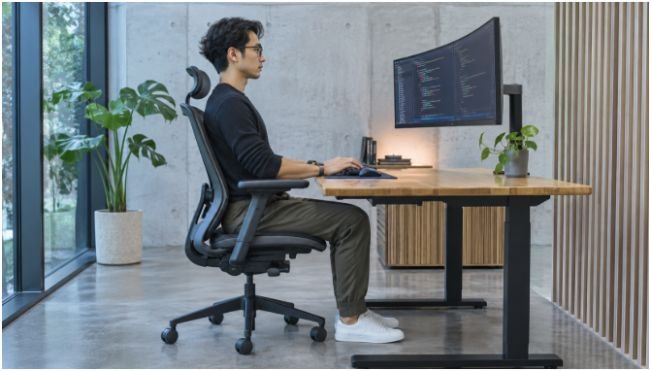
Even with a raised screen, I still caught myself sliding forward until my tailbone rested near the front edge of my seat. That classic “developer shrimp” posture flattens your lumbar curve and overloads your lower discs.
Instead of buying lumbar pillows that pushed me forward, I adjusted my seating mechanics. First, I raised my chair height until my thighs angled slightly downward, opening my hip angle past 90 degrees.
Second, I pulled my chair all the way under the desk so the backrest actually touched my lower spine. As noted in the Mayo Clinic office ergonomics guide, planting your feet flat on the floor—or on a small footrest—distributes weight evenly and stops your pelvis from tucking under.
Step 3: The 5-Minute Compile-Time Stretch Routine
Hardware fixes half the problem, but static posture still stiffens fascia and restricts blood flow. Research indexed by the National Institutes of Health (NIH) shows that uninterrupted sitting rapidly increases musculoskeletal discomfort in the lower back and shoulders.
I needed mobility work that required zero floor mats and zero outfit changes. I developed these simple desk stretches for software developers to reverse spinal compression in under five minutes. Perform every movement slowly while breathing deeply, never forcing your range of motion.
Seated Cat-Cow for Spinal Mobility
Sit near the edge of your chair with both feet flat on the floor and your hands resting on your knees. Inhale deeply as you arch your lower back, push your chest forward, and lift your chin slightly toward the ceiling.
Exhale slowly as you round your upper spine, tuck your chin to your chest, and pull your belly button inward. Complete eight to ten controlled repetitions to lubricate stiff spinal joints.
Seated Figure-Four Stretch for Tight Hips
Tight glutes and deep hip rotators tug directly on your lower back muscles. Sit upright with your left foot planted firmly on the floor, then cross your right ankle over your left knee.
Flex your right foot toward your shin to protect the knee joint from twisting. Keep your spine completely straight and hinge forward slightly from your hips until you feel a deep stretch in your outer right hip. Hold this position for 20 to 30 seconds per side for two sets.
Seated Spinal Twist for Thoracic Relief
Hours of hunching over a trackpad lock up your mid-back, forcing your lower back to overcompensate. Sit tall with your feet planted and keep your hips facing straight ahead throughout the movement.
Place your left hand on the outside of your right thigh and grip the back of your chair with your right hand. Gently rotate your upper torso to the right while looking over your right shoulder. Hold for 15 to 20 seconds on each side across two sets.
Standing Hip Flexor Lunge

Sitting shortens the psoas muscles connecting your legs to your lumbar spine, pulling your lower back forward when you stand. Stand beside your desk, rest one hand on the edge for balance, and step your right foot back into a staggered stance.
Bend your front knee slightly, tuck your tailbone underneath you to flatten your lower back, and shift your weight gently forward. You should feel a clean pull across the front of your right hip rather than a pinch in your spine. Hold for 20 to 30 seconds per side for two sets.
Desk-Supported Lat and Upper Back Stretch
Stand facing your desk and place both hands shoulder-width apart on the front edge. Walk your feet backward until your arms extend straight and your torso sits nearly parallel to the floor.
Keep a soft bend in your knees and press your chest gently downward toward the carpet. This movement decompresses your shoulders and lengthens tight lat muscles pulled inward by typing. Hold the stretch for 20 to 30 seconds for two sets.
Step 4: How I Built Habit Anchors Without Ruining Deep Work
During my first two weeks, I used a Pomodoro timer to remind myself to stretch every 50 minutes. I hated it. The alarm repeatedly broke my concentration right as I traced complex state bugs, so I started ignoring the alerts altogether.
My breakthrough came when I replaced clock-based alarms with workflow anchors. Instead of watching the time, I paired one or two stretches with natural coding pauses that already happened every hour:
- Waiting for local builds or Docker containers to compile: I knock out ten Seated Cat-Cows while watching terminal logs scroll.
- Running automated test suites or CI/CD pipelines: I stand up for two sets of the Standing Hip Flexor Lunge before checking test results.
- Finishing a pull request review: I complete the Desk-Supported Lat Stretch before grabbing my next Jira ticket.
Over 90 days, tracking my habits in a simple markdown log showed I averaged six micro-breaks per workday without losing a single minute of flow state. Consistency beat intensity every single time.
When Normal Stiffness Signals a Bigger Medical Issue
Knowing how to fix bad posture from working on a laptop also means knowing when to stop stretching. Muscular tightness feels like a dull, localized ache across your upper shoulders or lower back that improves once you move around.
Joint or nerve irritation feels completely different. Stop stretching immediately and consult a doctor if you experience sharp, shooting pain, electrical tingling, or numbness radiating down your arms or legs. Seek prompt medical evaluation if back pain follows a fall, wakes you from sleep, or accompanies leg weakness.
Frequently Asked Questions About Laptop Posture
1. How long does it take to fix bad posture from working on a laptop?
Most people feel noticeable relief from muscle tension within two weeks of raising their screen, while structural muscle rebalancing typically takes six to twelve weeks of consistent daily habits.
2. Can a posture corrector brace fix my laptop hunch?
Posture braces act as temporary physical reminders, but wearing them too long weakens your natural stabilizing muscles instead of strengthening them.
3. Is a standing desk better than sitting for laptop posture?
A standing desk relieves hip compression, yet you will still slouch forward unless your laptop screen sits at eye level on a separate stand.
4. How high should my laptop screen be on my desk?
Position your laptop stand so the top edge of the display aligns directly with your eyes when sitting upright with relaxed shoulders.
Quit Folding Like a Lawn Chair During Sprints
Your codebase will always have another ticket waiting, but you only get one spine. Do not wait until a pinched nerve forces you away from your keyboard for a week. Grab a stack of hardcover books right now, elevate your laptop screen to eye level, and pair an external keyboard before your next standup.