
A page can look finished before it is truly usable. That gap explains much of the debate around server side rendering vs client side rendering. One approach asks the server to prepare most of the HTML before the page reaches a visitor. The other gives the browser more responsibility, using JavaScript to construct the interface after loading begins.
Neither method automatically produces a faster, more searchable, or better website. The right choice depends on what users need to see first, how interactive the application is, how much JavaScript their devices must process, and how frequently the content changes.
Understanding that distinction matters because rendering architecture can influence performance, SEO, hosting resources, accessibility, and even development complexity.
What Actually Happens When a Web Page Renders?
A browser does more work than simply “open” an HTML file.
It receives resources such as HTML, CSS, JavaScript, fonts, and images, then converts HTML into the Document Object Model, processes styles, creates a render tree, calculates layout, and paints pixels onto the screen. Mozilla’s explanation of the browser rendering process is useful for developers who want to understand that sequence in more detail.
The main SSR-versus-CSR question is therefore simple: Who builds the useful HTML—the server or the browser?
Server-side rendering
With SSR, a visitor requests a URL and the server generates HTML containing most or all of the page’s meaningful content. The browser can begin parsing that HTML as soon as it arrives.
JavaScript may still load afterward to make components interactive. That process is often called hydration.
Client-side rendering
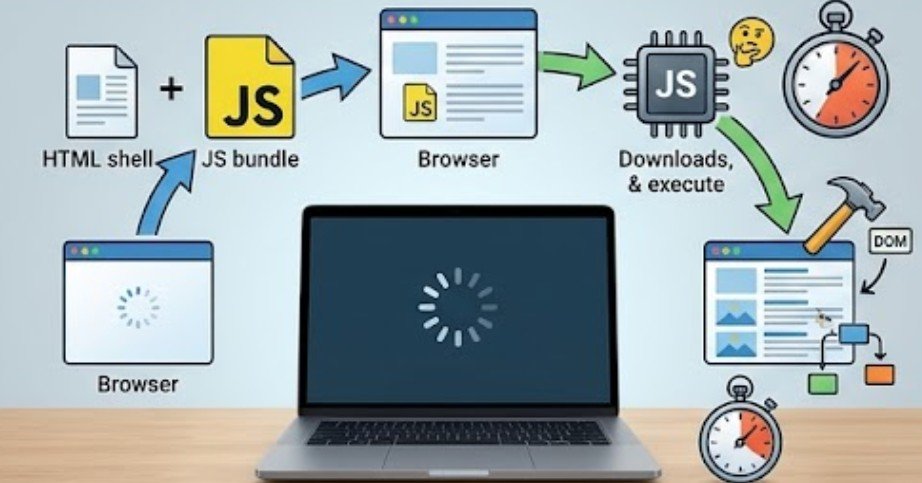
CSR usually sends a lightweight HTML shell plus JavaScript. After the JavaScript downloads and executes, it retrieves data if necessary and creates or updates the DOM.
MDN defines CSR as generating HTML content through JavaScript in the browser and notes that CSR and SSR can also be combined rather than treated as mutually exclusive architectures.
Server Side Rendering vs Client Side Rendering: The Differences Users Notice

The architecture sounds technical, but its effects are surprisingly visible.
SSR can deliver meaningful content earlier
Because HTML arrives with content already present, SSR can reduce the amount of client-side work required before visitors see useful information.
That advantage is especially important for product pages, news articles, landing pages, documentation, and other URLs where visitors expect immediate content.
CSR may introduce a longer chain:
browser downloads HTML → browser discovers JavaScript → JavaScript downloads → JavaScript executes → data loads → DOM is created → content appears.
Client-generated markup can also delay discovery of important resources. If JavaScript creates the page’s main image, for example, the browser may not discover that image until the script has executed.
CSR can make later interactions feel much faster
CSR has an important advantage after the application is running.
A dashboard, project management platform, email client, or analytics application can change views without requesting a completely new HTML document every time. JavaScript can fetch only the needed data and update part of the interface.
That is why CSR became closely associated with single-page applications.
If you are deciding whether your business site needs that application-like behavior at all, it is also worth understanding the broader difference between a static website and a dynamic website before selecting a rendering strategy.
What Does Rendering Strategy Mean for SEO?

SSR has a practical SEO advantage: important page content is available directly in the returned HTML.
CSR requires additional JavaScript execution before some content may appear. Modern search engines have become far better at processing JavaScript, so describing CSR as “invisible to Google” is outdated. Still, adding a JavaScript-dependent rendering stage creates more opportunities for technical problems.
A broken API call, blocked script, rendering error, authentication mistake, or excessive JavaScript workload can prevent important content from appearing correctly.
For pages that depend heavily on organic search—articles, category pages, product descriptions, local service pages, and marketing landing pages—I generally favor delivering essential content in HTML rather than making JavaScript responsible for creating everything.
The W3C has long documented the role of client-side scripts in dynamically changing HTML documents, while modern HTML guidance also encourages graceful behavior where scripting is unavailable.
The Performance Tradeoff Is More Complicated Than “SSR Is Faster”

SSR can improve initial rendering, but the server must perform work for requests.
Dynamic SSR may require database queries, API calls, template generation, personalization, and application logic before HTML can be returned. Poor server performance can therefore increase Time to First Byte. CSR moves more work onto the user’s device instead.
That may reduce some server rendering requirements and make CDN delivery easier, but the browser now has to download, parse, compile, and execute more JavaScript. On lower-powered phones or slow connections, that cost becomes particularly noticeable.
The HTML Living Standard also notes that scripts generally run to completion, meaning poorly managed JavaScript can interrupt other browser work.
So the useful question is not:
“Is SSR faster than CSR?”
Ask instead:
Where is my performance bottleneck—the network, server, JavaScript bundle, API, or user’s device?
A Simple Five-Step Test for Choosing SSR or CSR
Before choosing an architecture, run through five questions.
1. Does the page need organic search visibility?
If yes, make important headings, copy, links, products, and metadata available without depending entirely on delayed client rendering.
SSR, static generation, or a hybrid approach usually provides a safer foundation.
2. Is the interface highly interactive?
An internal CRM, trading dashboard, design tool, scheduling application, or project workspace may benefit heavily from CSR because the interface changes constantly without full-page navigation.
3. Does content change for every visitor?
Personalized accounts and rapidly changing data may require server-side generation or client-side API calls rather than fully static HTML.
4. How much JavaScript are you shipping?
Open browser developer tools and test the site under slower network and CPU conditions.
Check whether useful content appears before the main JavaScript finishes. Also measure Largest Contentful Paint and Interaction to Next Paint rather than judging performance by how fast the page feels on a development laptop.
5. Does the experience still work when something fails?
Disable JavaScript temporarily.
If an article, product page, navigation path, or critical form becomes completely blank, ask whether that dependency is necessary.
This principle also applies to form architecture. Regardless of rendering model, important validation and abuse prevention should not depend solely on browser-side logic.
For reliable form handling, combine browser-side feedback with server-side checks, and follow this guide on how to validate website forms on client and server side to understand how both layers help validate submissions and prevent invalid data from reaching your application.
For public forms, combine rendering decisions with measures designed to prevent spam submissions on website contact forms.
Security and Accessibility Still Matter
Changing where rendering occurs does not eliminate security risks. OWASP distinguishes between server-side vulnerabilities and client-side DOM-based problems. Client applications must be especially careful about inserting untrusted data into the DOM using unsafe APIs such as innerHTML.
CSR also requires thoughtful accessibility testing. Dynamically inserted content can work with assistive technology, but unexpected focus changes or rapidly changing DOM content may make an interface harder to navigate.
WebAIM recommends carefully managing dynamic updates, keyboard focus, and scripted interactions.
Why Hybrid Rendering Is Often the Better Answer

Modern web development is increasingly moving beyond the idea that every site must choose one rendering strategy.
Frameworks can generate initial HTML on the server or during a build, then activate JavaScript for interactive portions afterward. Some pages may be static, others server-rendered, while highly interactive sections remain client-rendered.
That lets a marketing page prioritize discoverability and fast content delivery while an authenticated dashboard behaves like an application.
For simpler projects, pre-generating HTML may eliminate much of the rendering problem entirely. A site that rarely changes can even be built and deployed from GitHub to a custom domain without requiring dynamic rendering for every request.
Frequently Asked Questions
1. Is server-side rendering better for SEO?
Usually for content-heavy pages. SSR delivers meaningful HTML immediately, reducing reliance on search engines successfully executing JavaScript before discovering important content.
2. Is client-side rendering bad for performance?
Not automatically. Well-built CSR applications can perform efficiently, but large JavaScript bundles, slow APIs, and excessive DOM work can noticeably delay rendering and interaction.
3. Can a website use SSR and CSR together?
Yes. Hybrid architectures commonly server-render initial content and then use client-side JavaScript for navigation, personalization, and interactive components.
4. Which rendering method is best for an e-commerce site?
Many stores benefit from server-rendered or pre-rendered product and category pages combined with client-side functionality for filters, carts, recommendations, and account features.
Final Thoughts
The most useful lesson in server side rendering vs client side rendering is that the browser eventually renders the interface either way; the architecture determines how much work happens before the browser receives useful content.
For public, search-driven pages, I would keep critical information available in the initial HTML and minimize unnecessary JavaScript. For highly interactive applications, shifting carefully selected work to the client can deliver a smoother experience.
The strongest architecture is often neither pure SSR nor pure CSR. It is the one that sends the right work to the right place—and proves the decision with real performance, accessibility, SEO, and user testing.