
A form can look polished and still accept broken or hostile data. Learning how to validate website forms on client and server side solves both problems: users get fast feedback, while your application controls what reaches its database.
I treat every form as two cooperating systems. The browser helps a person complete the fields. The server decides whether the submission can be trusted. That split has prevented more bugs for me than any complicated regular expression.
Why Both Validation Layers Matter
Client-side validation runs in the browser. It catches missing values, incorrect formats, and simple range errors before a network request occurs.
Server-side validation repeats every essential rule after the request arrives. A user can disable JavaScript, edit page markup, or call the API directly. OWASP recommends checking untrusted input early and validating both its syntax and business meaning.
The practical rule is simple: browser checks improve usability, while server checks protect the workflow.
Start With Native HTML Validation
HTML should handle basic rules before JavaScript enters the picture. Native controls are fast, lightweight, and supported by modern browsers.
Choose The Correct Attributes
Use required for mandatory fields, type=”email” for email addresses, and min or max for numerical limits. Use minlength, maxlength, and pattern only when the requirement is clear.
<form id=”signupForm”>
<input name=”email” type=”email” required>
<input
name=”username”
minlength=”3″
maxlength=”30″
pattern=”[A-Za-z0-9_]+”
required
>
<button type=”submit”>Create Account</button>
</form>
The browser can block submission when a control fails its defined constraints. MDN also documents checkValidity(), reportValidity(), and custom messages through the Constraint Validation API.
These attributes work well for registration, contact, checkout, booking, and newsletter forms. They also reduce the amount of JavaScript you need to maintain.
Avoid Overly Strict Patterns
Names, addresses, and international phone numbers may contain spaces, punctuation, or Unicode characters. A narrow regular expression can reject real customers even when their information is valid.
I use allowlists for highly structured values, such as state codes, subscription plans, or account types. I avoid aggressive character bans in free-text fields.
OWASP warns that denylist filters often reject legitimate input while remaining easy for attackers to bypass.
Add JavaScript For Cross-Field Rules
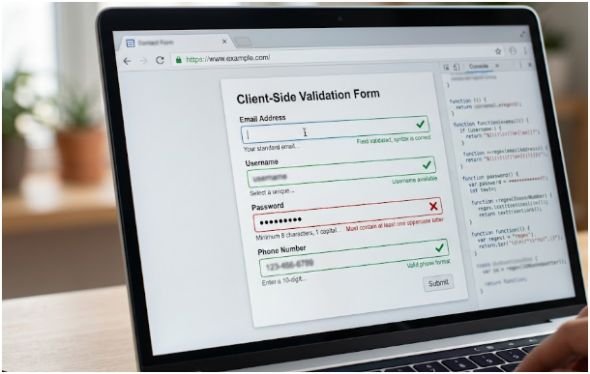
JavaScript becomes useful when one field depends on another. Common examples include matching passwords, conditional questions, related dates, and file-size previews.
Check Related Fields
Use setCustomValidity() to connect custom logic with the browser’s native validation system.
function checkPasswords() {
const mismatch = password.value !== confirmation.value;
confirmation.setCustomValidity(
mismatch ? “Passwords must match.” : “”
);
}
form.addEventListener(“submit”, (event) => {
checkPasswords();
if (!form.checkValidity()) {
event.preventDefault();
form.reportValidity();
}
});
This approach prevents submission when the passwords differ while preserving native browser behavior.
I normally validate after meaningful input, when a user leaves a field, and again during submission. Displaying errors after every keystroke can interrupt people before they finish entering a valid value.
Make Errors Accessible
Color alone does not explain what went wrong. Place a short message near the affected field and connect it using aria-describedby.
After an unsuccessful submission, move keyboard focus to the first invalid field. For longer forms, add an error summary at the top with links to every affected control.
W3C guidance recommends text-based explanations, correction instructions, field references, and role=”alert” for dynamically inserted error summaries.
A useful error says, “Enter a ZIP code using five digits.” A weak error only says, “Invalid input.”
Treat The Server As The Final Gatekeeper

The server must assume every request is untrusted. That includes submissions from your own interface, mobile applications, third-party integrations, and direct API calls.
Validate Structure And Meaning
Your backend should verify required fields, data types, string lengths, numerical ranges, allowed values, and relationships between fields.
It should also reject unexpected properties. Silently accepting extra fields can create security and data-quality problems, especially when objects are passed directly into database operations.
After structural validation, check business meaning. A date may use the correct format but fall outside the allowed booking period. A coupon may match the required pattern but already be expired.
These business rules belong on the server because they may depend on trusted application data.
Use A Backend Validation Library
For Express applications, express-validator provides validation middleware, sanitizers, matched data, and error results. Its official documentation currently identifies version 7.3.0.
app.post(“/register”, [
body(“email”).isEmail().normalizeEmail(),
body(“password”).isLength({ min: 12 })
], (req, res) => {
const errors = validationResult(req);
if (!errors.isEmpty()) {
return res.status(422).json({
errors: errors.array()
});
}
return res.status(201).json({
message: “Account created”
});
});
Return errors in a predictable structure. Include a field identifier, a human-readable message, and a stable error code when the frontend needs programmatic handling.
HTTP 422 suits a request whose format is understood but whose contents cannot be processed. RFC 9457 also defines a standard problem-details format for machine-readable API errors.
Use My Four-Gate Validation Contract

My preferred method for how to validate website forms on client and server side uses four separate gates. Giving each gate one responsibility keeps validation easier to test and maintain.
Gate One: Browser Constraints
Check presence, format, type, length, and range with HTML attributes. The goal is immediate feedback rather than security.
Gate Two: Interface Logic
Check relationships that improve the current experience. Examples include matching passwords, requiring a company name for business accounts, or checking that an end date follows a start date.
Gate Three: Server Schema
Repeat every essential structural rule against the received payload. Reject unknown fields and convert values only through explicit rules.
Never trust a value merely because the browser displayed a dropdown. A direct request can submit an option that never appeared in the interface.
Gate Four: Business And Database Rules
Confirm username availability, inventory, account status, permissions, coupon validity, and database constraints.
For example, an email address can pass the first three gates but fail the fourth because it already belongs to an account. Return that error beside the email field so the user receives a precise next step.
Do Not Confuse Validation With Security
Validation confirms that input matches your application’s rules. It does not replace controls designed for specific security threats.
Use parameterized queries instead of joining user input into SQL strings. OWASP lists prepared statements with parameterized queries as its primary SQL injection defense.
Use context-aware output encoding when displaying untrusted text. Apply HTML sanitization when users are intentionally permitted to submit rich content.
OWASP explains that output encoding makes untrusted input appear as data instead of executable browser code.
Authenticated forms that change account data may also need cross-site request forgery protection. The server can verify a CSRF token sent through a hidden field or request header.
Validation, parameterized queries, output encoding, authorization, and CSRF protection solve different problems. Secure forms usually need several of them working together.
Share Rules Without Sharing Trust

Frontend and backend requirements often drift. The browser may require eight password characters while the API expects twelve.
In TypeScript projects, I prefer a shared schema for safe structural rules. Zod supports schemas in modern browsers and Node.js, but the server must still run the schema independently on every request.
Keep authorization, pricing, permissions, and database checks on the server. Any logic shipped to a browser can be inspected or modified.
Your website architecture also affects where backend validation runs. Review static website vs dynamic website for small business before choosing a traditional server, serverless function, or external form-processing service.
Test The Failure Paths
Testing only successful submissions leaves the most important paths untouched. I test empty fields, boundary lengths, incorrect types, extra JSON properties, malformed dates, duplicate records, and requests that skip the interface.
I also repeat the test with JavaScript disabled. This confirms that the backend still rejects invalid data when browser safeguards disappear.
For every numerical boundary, test the value below, at, and above the limit. A 12-character password minimum needs tests using 11, 12, and 13 characters.
Check the returned status, error structure, field association, focus behavior, and retained form values. Users should not need to re-enter every correct field because one value failed.
FAQs
1. Is Client-Side Form Validation Enough?
No. It improves feedback, but the server must independently validate every submitted value.
2. What Is The Difference Between Client And Server-Side Validation?
Client validation improves browser usability, while server validation protects data and business processes.
3. Can I Validate A Website Form Without JavaScript?
Yes. HTML attributes provide native checks, but server-side validation remains mandatory.
4. Should Frontend And Backend Validation Rules Match?
Core structural rules should match, while sensitive business and authorization checks must remain server-controlled.
Your Form Is Not Done Until Bad Data Fails Gracefully
Knowing how to validate website forms on client and server side means designing for failure, not only successful clicks. Start with HTML, add focused JavaScript, and verify the complete payload on the server.
My final tip is blunt: try to break your own form before a user does. Bypass the browser, submit impossible values, and confirm that every error returns to the correct field with a useful correction.